


Local Weather Forecast& Widget
4.5549.00 Reviews
App Specs
- Version
- 1.5.7
- Updated On
- License
- Free
- Downloads
- 5,000,000+
- Developer
- Life Assistant Studio
- Categories
- Weather
- Platform
- Android
Screenshots
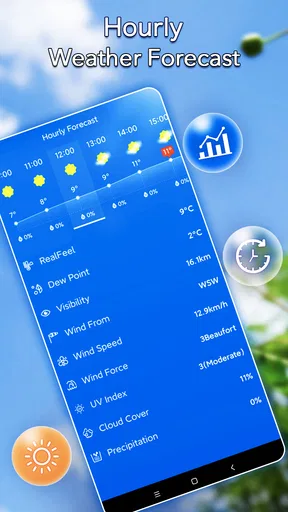
 Analysis by AppCompare
Ever found yourself caught in a sudden downpour without an umbrella, or layered up for a snowstorm that never came? Yeah, we've all been there. That's why I decided to check out the Local Weather Forecast & Widget app. Spoiler alert: it might just become your new best friend when it comes to planning your day around the weather.
Who benefits most from a quick local check
I find this app most useful for the small decisions that shape an ordinary day: whether to walk instead of drive, take a jacket, or move a lunch break indoors. Its focus on current local conditions and a glanceable widget suits people who want a practical weather check without making a full forecast study part of their morning. If you regularly make plans around temperature, wind, rain, or sun exposure, the details gathered on the home screen can help you think beyond a single number.
A realistic routine is to check the screen before leaving home, then look again before an outdoor commitment later in the day. The first glance helps with clothing; a later one can prompt you to bring water, sunscreen, or a rain layer. I would treat those details as planning cues, not guarantees. Weather can shift, and an app’s local estimate is still an estimate, especially when conditions vary across a large area.
The app is free to start, is rated for Everyone, and is made by Life Assistant Studio. It has an average rating of 4.5 from around 58,000 ratings, with more than five million installs. Those figures suggest it has reached a broad audience, but they do not tell me whether its presentation will suit every person or every routine. I’d judge it by whether the information is easy for you to read and useful where you live.
Getting Started with Local Weather Forecast & Widget
Diving into the app, I was greeted by a clean and user-friendly interface. It's like the developers took a page out of "how to make things easy for the user" playbook. No more squinting at tiny fonts or navigating through a maze of menus. Everything you need is right there at your fingertips.
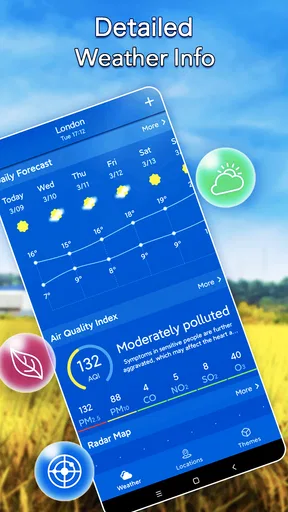
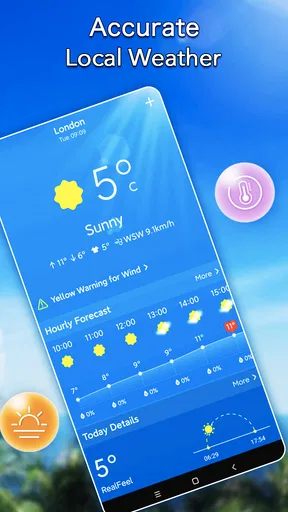
The home screen displays the current weather in your location, and it's not just about the temperature. Oh no, it’s much more detailed than that. You get a snapshot of the humidity, wind speed, and even the UV index. Plus, the little weather icons are a nice touch—they're not just informative but pretty cute too.
Readability and navigation in everyday use
For someone who checks the weather while getting ready or heading out, a straightforward screen matters more than a long list of charts. In my experience, the benefit here is that current conditions and several useful context clues sit together, so I can make a quick decision without hunting through layers of menus. The app’s version 1.5.7 runs on Android 6.0 or later, which makes it an option for people keeping an older compatible Android device in service as well as for more recent users.
Worth Reading Before You Choose

Flipboard Shows What News Apps Must Do Beyond the Feed

Switching to Android Auto Means Rethinking Your Driving Routine

Google Calendar Makes a Crowded Week Easier to Manage

Ludo King Makes the Most of the Minutes Between Plans

Baby Panda World Brings Quick Play to Modern Phones, but Its Game Library Feels Busy

ESPN’s Live Game View Makes Following Close Games Easier
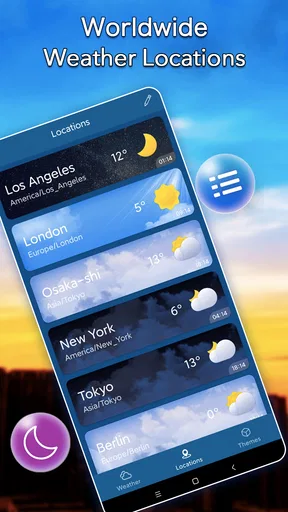
That simplicity has a trade-off. People who prefer to compare several locations, inspect long-range trends, or dig into specialist meteorological details may find a quick local screen less satisfying than a dedicated forecasting service with more analytical tools. I would use this app for daily choices, then consult another source when a decision depends on more than a general local outlook.
Features That Make a Difference
What sets Local Weather Forecast & Widget apart is its ability to offer hyper-local forecasts. No more generic city-wide predictions. This app gets down to your neighborhood's nitty-gritty, so you know exactly what's coming your way.
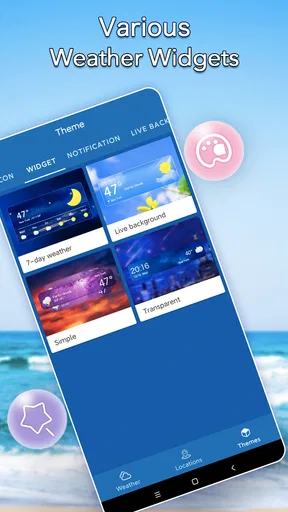
The app also boasts a handy widget feature. I'm a sucker for widgets that keep me updated at a glance, and this one doesn't disappoint. Whether you're on team Android or iOS, there's a widget option that fits seamlessly onto your home screen. It's perfect for those quick morning checks when you're rushing out the door.
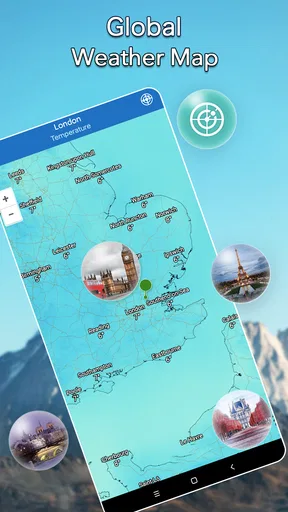
Another cool feature is the radar map. It’s like having your personal meteorologist. You can see weather patterns moving across the map in real-time, which is super helpful if you're planning a road trip or an outdoor event.
Motor, sensory, and situational access
A widget can reduce the number of actions needed for a routine check: instead of opening an app and navigating around, I can look at the home screen when I have a moment. That can be helpful when my hands are occupied with bags, a commute, or a quick stop at the door. It is also a useful option for anyone who prefers fewer interactions, though it cannot replace a careful look at the full forecast when the day’s plans are sensitive to changing conditions.
The clear layout described in my use is a welcome starting point for readability, but visual comfort varies. Small text, contrast, and icon meaning can affect people differently, and cute weather symbols may be less immediately clear than words for some users. I’d recommend checking the actual display on your own device and adjusting any available system-level text or display settings if the screen feels crowded. I would not assume that a simple interface automatically meets every visual or motor need.
There is a similar distinction between a glance and a notification. Alerts can be useful when I cannot keep checking the screen, but a sound or vibration may not work well in every setting, and some people may prefer a quiet visual check instead. I treat notifications as a backup rather than the only way to learn about a weather change. That is especially sensible when I am somewhere I cannot hear a phone or when interruptions would be unwelcome.
Using the widget and radar with a little care
One practical workflow is to use the widget for routine checks and open the radar map only when timing matters. For example, if I have an outdoor errand, the glanceable view helps me decide whether to bring a layer; if rain appears likely, the map can help me judge whether to wait or leave sooner. That division keeps the quick screen useful without expecting it to answer every question.
For a road trip, I would check the route and destination separately rather than assuming that conditions at home represent the whole journey. A neighborhood-focused forecast is valuable precisely because weather can differ from one place to another, but that also means a single location cannot stand in for an entire route. Before a longer drive or an event that would be difficult to postpone, I would cross-check the relevant locations and keep an eye on updated conditions.
People often ask whether a weather app can be trusted for a specific plan. My answer is that I use this one as a convenient guide for everyday decisions, not as a promise that the weather will unfold exactly as shown. Local forecasts and radar are helpful for judging what may be approaching, but I still leave room for uncertainty. If the consequences of getting caught out are serious, I would compare another forecast source rather than rely on one app alone.
Personal Experience and Usability
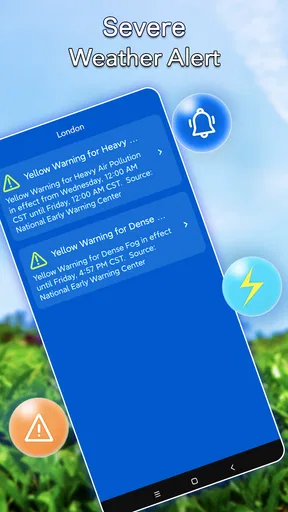
Over the past week, I’ve tested the app in various weather conditions, from sunny days to stormy nights. It was surprisingly accurate each time. I appreciated the push notifications that alerted me about sudden weather changes. It's like the app is looking out for me, making sure I don't step out in flip-flops when it's about to rain cats and dogs.
Setting up alerts is a breeze. You can customize them according to your preferences. Want a heads-up when the temperature drops below a certain point? Easy peasy. Need a reminder to apply sunscreen when the UV index is high? Done and dusted.
For accessibility and comfort, I would choose alerts selectively rather than turning on every possible prompt. A temperature threshold or a weather-change alert has a clear purpose; too many notifications can become background noise and make an important one easier to miss. My tip is to connect each alert to an actual decision you need to make, such as clothing or an outdoor plan, and keep the widget for everything that only needs a glance.
Another question worth considering is whether the app makes sense for someone who does not want constant phone interruptions. It can still be useful as a manual check: open it when planning a day, or consult the widget when convenient, without treating notifications as essential. Conversely, someone who needs highly specialized warnings or detailed planning tools should compare it with services built around those needs before relying on it as their only source.
Where it fits among weather alternatives
Compared with the basic weather panel already included on many phones, this app’s appeal is the combination of local conditions, a widget, and a radar view. That can make it a more engaging choice for someone who wants to see more than a temperature at a glance. Compared with specialist weather services, though, its approachable everyday focus may not provide the depth that enthusiasts or professionals expect. I see it as a convenient middle ground: more hands-on than a bare glance, less suited to detailed forecasting work.
It is free to download, with in-app purchases listed at $4.99 per item. I would start with the free experience and decide whether it covers my routine before considering any purchase. That is a sensible approach for a simple daily tool: first see if the display, widget, and local information fit the way you actually check the weather. I would also avoid assuming that every person needs paid extras just because they are available.
Remaining barriers and who may want another option
The biggest limitation is not a particular missing feature so much as the gap between a quick forecast and a full planning system. If I need to coordinate multiple stops, compare many places, or make decisions where precise timing is critical, I want to verify the forecast elsewhere too. The same goes for people who depend on a particular presentation style, notification behavior, or specialist detail: the best choice is the one they can comfortably use and trust in their own circumstances.
Someone who rarely checks weather, prefers not to install another app, or is already satisfied with a built-in forecast may not gain enough to justify switching. I would also hesitate to recommend it as a sole resource for people who need highly detailed or specialized weather information. Its strongest case is ordinary local planning, not replacing every tool a traveler, outdoor professional, or weather enthusiast might need.
The Verdict
So, would I recommend Local Weather Forecast & Widget? Absolutely. It's a solid app that delivers on its promise to provide accurate and local weather forecasts. The intuitive interface, detailed data, and useful widgets make it a must-have for anyone who likes to stay one step ahead of the weather.
In a world where plans often hinge on whether the sun decides to shine or the skies open up, having an app like this feels like a tiny superpower. So go ahead, give it a whirl and see how it transforms the way you plan your days. Just remember to thank me when you’re the only one who remembered an umbrella.
An inclusive verdict for practical weather checks
My recommendation comes with a clear boundary: I like this as a fast, approachable way to make everyday weather decisions, especially when a widget or a short visit to the home screen is enough. The combination of local details and a radar view gives me useful ways to move from a quick check to a closer look, while alerts can serve as reminders when I choose to use them.
For readers who care about access, I would try the actual interface on the device and in the situations where they expect to use it. Check whether the text and symbols are comfortable, whether the widget is easy to reach, and whether notifications help rather than distract. The app is suitable for Everyone by its age rating, but that is not the same as a guarantee that every person will find it accessible. In my view, it is a promising everyday option for people who want uncomplicated local weather, while anyone with more demanding access or forecasting needs should test it alongside an alternative before depending on it.
Pros
- Accurate real-time weather updates.
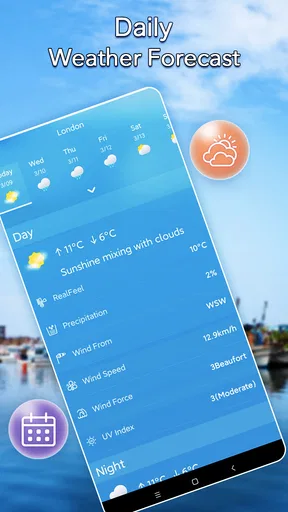
- Detailed 7-day weather forecasts.
- Customizable widgets for your home screen.
- Minimal data usage for updates.
- User-friendly interface with intuitive navigation.
Cons
- Ads can be intrusive in free version.
- Limited features without premium subscription.
- Occasional lag in widget updates.
- Requires location access for full functionality.
- No offline mode for weather data.
FAQs for Local Weather Forecast& Widget
How accurate is the Local Weather Forecast & Widget app?
The Local Weather Forecast & Widget app uses advanced meteorological data to provide highly accurate weather forecasts. It sources information from reliable weather stations and updates in real-time to ensure users receive the most current weather conditions. However, like all weather apps, slight variations may occur due to unpredictable weather changes.
Can I customize the widgets on the Local Weather Forecast & Widget app?
Yes, the app offers a variety of customization options for its widgets. Users can choose from different widget sizes, themes, and display settings to match their preferences. You can also select what specific weather information to display, such as temperature, humidity, or precipitation forecasts, making it versatile and user-friendly.
Does the Local Weather Forecast & Widget app require a constant internet connection?
While the app functions best with a constant internet connection to provide real-time updates, it can also work offline by using cached data for previously accessed locations. This allows users to view past weather information even when they’re not connected to the internet, although updates will only be available once reconnected.
Is the Local Weather Forecast & Widget app free to use?
The app offers a free version that includes basic features such as current weather conditions and short-term forecasts. However, there is also a premium version available for users who need advanced features like detailed long-term forecasts, ad-free usage, and enhanced customization options. Subscription details are available within the app.
How does the Local Weather Forecast & Widget app handle severe weather alerts?
The app is equipped to provide timely severe weather alerts and notifications to help keep users safe. These alerts are based on data from trusted meteorological sources and are designed to inform users of critical weather changes such as storms, heavy rainfall, or extreme temperatures, allowing for adequate preparation and response.


